

Cross-App Authentication on AT Protocol: How Roomy and OpenMeet Share Identity
The Problem
You’re using Roomy to collaborate with your community. Roomy’s team designed a calendar view that pulls in AT Protocol events. Someone created an event on OpenMeet and it shows up right there. You click the event, and now you’re on OpenMeet, staring at a login page. You already proved who you are when you logged into Roomy. Why do you have to do it again?
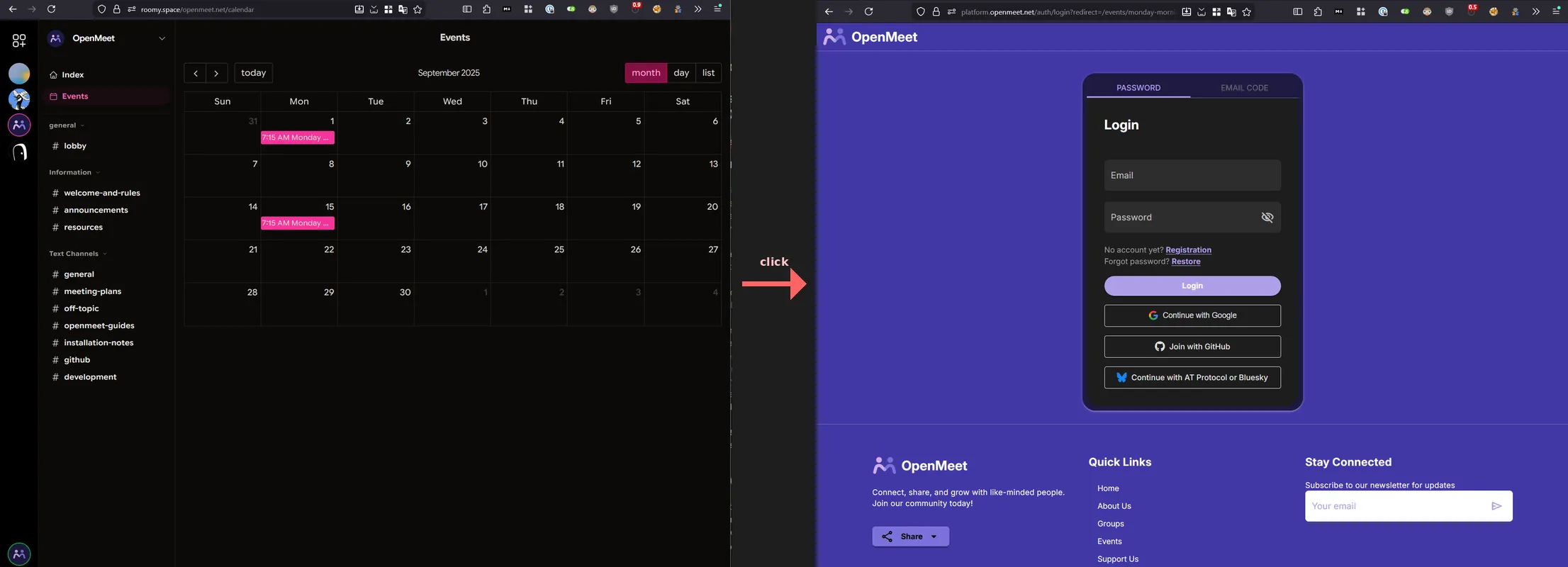
This is the classic federated identity problem. How do you carry your authenticated session from one app to another without a centralized identity provider like “Sign in with Google”?
On AT Protocol, the answer is service auth. We recently shipped a working implementation between Roomy and OpenMeet that makes this seamless.
Experimental: proceed with caution. We’re using AT Protocol’s service auth JWTs for third-party cross-app login. This is not an officially documented pattern and has not been vetted by the atproto community. This writeup is to discuss it. The cryptographic primitives work, but we may be pushing the spec beyond its intended use. This approach could break or be explicitly discouraged in future revisions. If you implement this, read the limitations section first and understand the risks.
Update (2026-03-10): After community feedback, we’ve clarified the distinction between identity and authorization in cross-app auth, and documented the concrete differences in what new users vs. existing users can do. The original post was accurate but understated how much the experience differs depending on whether the user has a full OAuth session. See Identity vs. Authorization: What Users Can Actually Do for the details.
How AT Protocol Service Auth Works
Every AT Protocol user has a Personal Data Server (PDS) that holds their data and signing keys. The PDS can issue short-lived JWTs on behalf of the user, signed with the same cryptographic key that signs their repository updates.
The XRPC spec defines the JWT format:
| Claim | Required | Purpose |
|---|---|---|
iss | Yes | The user’s DID (decentralized identifier). Can include a service suffix like #atproto_labeler |
aud | Yes | The DID of the service being called |
exp | Yes | Expiration timestamp (typically <60 seconds) |
iat | Yes | Token creation time |
jti | Yes | Unique random nonce for replay prevention |
lxm | Optional | Lexicon method being invoked. Scopes what the token can do |
The JWT is signed with the account’s atproto signing key, the same cryptographic key that signs all of the user’s repository data. Anyone can verify the signature by resolving the user’s DID document and checking the public key listed there.
The important thing here is that the PDS is the root of the user’s authority. When Roomy needs to prove to OpenMeet that a user is who they claim to be, it asks the user’s PDS to sign a JWT addressed to OpenMeet. OpenMeet verifies that signature by resolving the user’s DID document and checking the signing key. No shared secrets between the apps. No centralized auth server. No OAuth dance between Roomy and OpenMeet.
How Bluesky uses this today
Bluesky uses service auth internally for its own services. You can see it in any Bluesky-compatible OAuth client’s scope list: scopes like rpc:chat.bsky.convo.getConvo?aud=did:web:api.bsky.chat#bsky_chat authorize the PDS to sign tokens addressed to the chat service. The Bluesky service auth docs describe the mechanism.
But there’s a caveat. As discussed in atproto#3424, service auth’s scope system is still being formalized. The Bluesky team has stated that “PDS instances should not accept service auth from any other service” for PDS-to-PDS operations. Right now the mechanism is limited to specific use cases like account operations and video blob uploads.
What we’re doing is different: using service auth for third-party cross-app authentication, where neither Roomy nor OpenMeet is the PDS. The PDS signs the token, but a separate application server consumes it. This works because the JWT verification is generic; any service can resolve a DID document and check a signature. But we should be honest: this is a gray area. The spec doesn’t explicitly prohibit what we’re doing (we’re not a PDS accepting tokens from another PDS, which is discouraged). But it also wasn’t designed for this. We’re relying on the generality of the crypto, not on a formal blessing from the spec authors.
The Implementation
1. OAuth Scope Declaration (Roomy side)
Before Roomy can request service auth tokens for OpenMeet, the user needs to grant that permission during OAuth login. Roomy declares the scope in its OAuth client metadata:
rpc:net.openmeet.auth?aud=*
This follows AT Protocol’s permission format: rpc:<lexicon-method>?aud=<service-did>. The aud=* wildcard means the user consents to Roomy requesting net.openmeet.auth tokens addressed to any service DID. At token-signing time, Roomy passes a specific audience (e.g., did:web:api.openmeet.net), and OpenMeet’s verifier checks that aud matches its own DID. We use the wildcard because dev, staging, and prod each have different DIDs. For production you could pin to a specific DID for tighter security. More on that below.
This scope gets consented to alongside Roomy’s other service auth scopes (Bluesky chat, profile lookups, etc.) during OAuth login. If the scope is missing, the PDS refuses to sign tokens for OpenMeet. We learned this the hard way: the scope was in the dev config but missing from the production build script. Users on roomy.space got invalid_scope errors until we fixed it (roomy#591).
Another thing we ran into: when you add a new scope, existing users don’t have it. Their session was granted before the scope existed. Rather than forcing everyone to log out and back in, Roomy now detects stale scopes at session restore. It compares the granted scopes against the current required scopes, and if anything’s missing, silently redirects through the PDS authorization flow. The user’s DID gets passed to oauth.authorize(), so the PDS knows who’s re-authorizing and doesn’t prompt for credentials again (roomy#598).
2. Token Exchange (Roomy → OpenMeet API)
When a user opens Roomy’s calendar page, Roomy silently connects to OpenMeet in the background:
// Roomy asks the user's PDS for a service auth token
const serviceDid = `did:web:${new URL(apiUrl).hostname}`;
const token = await peer.getServiceAuthToken(serviceDid, "net.openmeet.auth");

// Send it to OpenMeet's service auth endpoint
const response = await fetch(`${apiUrl}/api/v1/auth/atproto/service-auth`, {
  method: "POST",
  headers: { "Content-Type": "application/json", "x-tenant-id": tenantId },
  body: JSON.stringify({ token }),
});

// OpenMeet returns standard JWT access/refresh tokens
const { token: accessToken, refreshToken } = await response.json();
No redirect, no popup, no login form. Roomy’s JavaScript client now holds OpenMeet API tokens and can make authenticated calls (fetching events, checking RSVP status) on behalf of the user.
But these tokens live in Roomy’s JavaScript context. When the user clicks a calendar event and Roomy opens the OpenMeet website in a new browser tab, that tab has no tokens. The user would see a login page. That’s where magic login links come in.
3. Verification (OpenMeet API)
On the OpenMeet side, the verification steps are:
- Decode the JWT, validate
iss,aud,exp - Check
audmatches our service DID (did:web:api.openmeet.net) - Check
lxmisnet.openmeet.auth. This isn’t a published lexicon; it’s a convention string in NSID format that both sides agree on. The spec makeslxmoptional, but we require it; tokens without method binding are too broad for our use case - Check expiration: reject anything older than 60s or with expiry more than 5 minutes out
- Resolve the DID document: fetch the user’s signing key from PLC directory. This is one network call per auth exchange; after that, the user has session tokens and subsequent requests skip DID resolution
- Verify the signature using
@atproto/crypto’sverifySignature() - Replay protection: the spec requires a
jtinonce for replay prevention. We validate it’s present (a token without one is non-compliant), but key our replay protection on a SHA-256 hash of the full token, which works regardless of whether the PDS generates truly unique nonces - Find or create the user: look up the DID in our identity table. Auto-create a minimal account if they’re new
If everything checks out, OpenMeet issues standard JWT access and refresh tokens.
To be precise about what’s happening here: OpenMeet is acting as an authorization server. The PDS-signed JWT is an identity proof, consumed once and discarded. OpenMeet verifies the identity, then issues its own tokens that grant access to OpenMeet’s API, not to AT Protocol data. The service auth exchange doesn’t give Roomy (or the user) any ability to read or write AT Protocol records through OpenMeet. It just lets them skip the login form. OpenMeet’s own permission system takes over from there.
The Magic Login Link: Crossing the Browser Boundary
Service auth gives Roomy’s JavaScript client API-level access to OpenMeet. But when the user clicks a calendar event and opens the OpenMeet website in a new tab, the browser needs its own session.
We solved this with one-time login links:
- Roomy (already holding OpenMeet API tokens) calls
POST /api/v1/auth/create-login-linkwith the target path (e.g.,/events/my-event-slug) - OpenMeet generates a random 64-character hex code, stores it in Redis with a 60-second TTL tied to the user ID and tenant, and returns a URL:
https://platform.openmeet.net/auth/token-login?code=a1b2c3...&redirect=%2Fevents%2Fmy-event - Roomy opens this URL in a new browser tab
- OpenMeet’s platform exchanges the code for JWT tokens (
POST /api/v1/auth/exchange-login-link) and redirects to the event page
The code is single-use (Redis GETDEL atomically retrieves and deletes), expires in 60 seconds, and rejects open redirects (the path must be relative, no ://, no protocol-relative URLs).
One UX trick worth mentioning: Roomy opens the tab with window.open("about:blank") immediately on click to preserve the user gesture and avoid popup blockers, then sets w.location.href to the login link URL once the API responds.
Security: What’s Good and What’s Not
The things we feel good about:
- No shared secrets between Roomy and OpenMeet. Authentication is cryptographically verified against the DID document.
- Short-lived tokens: service auth JWTs expire in <60 seconds, login link codes in 60 seconds.
- Single-use tokens: both service auth tokens and login link codes are consumed on first use via Redis-backed replay protection.
- User-consented scopes: the user explicitly grants the
rpc:net.openmeet.authscope during OAuth login. - Audience binding at verification time: OpenMeet checks that
audmatches its own service DID, so a token addressed todid:web:api.openmeet.netis useless at any other service. - Method binding: the
lxmclaim restricts what the token can do (justnet.openmeet.auth, not arbitrary API calls).
Limitations and warnings
A short-lived token creates a long-lived session. This is the biggest thing to understand. The service auth JWT is single-use and expires in 60 seconds, but once exchanged it becomes a full OpenMeet session with a JWT and refresh token that lasts much longer. If someone manages to replay the token within that 60-second window, they get a persistent session. The short TTL and single-use properties shrink the attack window, but they don’t shrink the blast radius. The same applies to login link codes.
PDS proxying as an alternative for API calls. For API-level access (Roomy fetching events from OpenMeet), XRPC proxying through the PDS could avoid this problem entirely. Instead of exchanging one service auth token for a long-lived session, each API call would be individually proxied through the user’s PDS with its own short-lived JWT. This is how Bluesky’s own services work, with the PDS creating a new token for each call to the appview. The tradeoff is that the receiving service’s endpoints need to be XRPC-based (lexicon-defined), and each call pays the cost of DID resolution. The login link problem remains either way: getting a browser session still requires some form of token exchange.
Identity vs. Authorization: What Users Can Actually Do
This is authentication, not authorization, and the distinction matters more than we initially let on. Service auth proves the user is who they claim to be. It says nothing about what they can do with AT Protocol data. OpenMeet is an authorization server in this context: it verifies identity via the PDS-signed JWT, then issues its own session tokens that grant access to OpenMeet’s API.
Here’s what that means concretely. A user arriving from Roomy via service auth gets a different experience depending on whether they already have an OpenMeet account with a linked AT Protocol session:
| New user (service auth only) | Existing user (has AT Protocol OAuth) | |
|---|---|---|
| Browse events | Yes | Yes |
| RSVP to events | Yes (saved in OpenMeet) | Yes (saved in OpenMeet) |
| Create events | Yes (saved in OpenMeet) | Yes (saved in OpenMeet) |
| Events published to AT Protocol | No | Yes |
| RSVPs published to AT Protocol | No | Yes |
| Identity verified | Yes (DID signature) | Yes (DID signature) |
The “No” entries are the important ones. A new user coming through Roomy has proven their identity (we know their DID, we’ve verified the signature) but OpenMeet doesn’t have an OAuth session with their PDS. Writing records to a user’s PDS repository requires AT Protocol OAuth, which is a separate authorization grant with its own consent flow. Service auth is an identity shortcut; it doesn’t (and shouldn’t) carry write permissions to someone else’s data store.
This means events created by service-auth-only users live in OpenMeet’s database but aren’t published to the AT Protocol network. The user’s data is real and functional within OpenMeet, but it’s not portable or federated until they complete an OAuth flow to link their PDS. We’re working on surfacing this distinction in the UI; right now the difference is invisible to users, which isn’t good enough.
Roomy doesn’t get any special access or elevated privileges; it just helped the user skip the login form. If you needed something like “Roomy can RSVP for me but can’t delete my events,” you’d need a cross-app authorization layer on top, which the protocol doesn’t provide yet.
The login link is a bearer token. Anyone who gets the URL within the 60-second window can use it. HTTPS keeps it off the wire, and single-use means it can’t be replayed, but don’t log these URLs.
PDS compromise is the big risk. If a user’s PDS is compromised, the attacker can sign valid service auth tokens for any account on that PDS. Unlike a password breach (where you reset passwords), key compromise means the attacker is the signing authority. The user’s recourse is to rotate their signing key via the PLC directory, but most users won’t know to do this. This is the fundamental tradeoff of PDS-rooted identity: you get decentralization, but the PDS operator has complete control over their users’ auth. Self-hosting shifts trust from a corporate provider to your own infrastructure security.
PDS availability matters. If the user’s PDS is down, Roomy can’t get a service auth token. No offline fallback. That’s the tradeoff with federation.
The aud=* scope wildcard. In Roomy’s OAuth scope, aud=* means the user consents to Roomy requesting net.openmeet.auth tokens for any service DID. OpenMeet still validates aud at verification time, so a token addressed to our DID is useless elsewhere. But a compromised version of Roomy could request tokens addressed to other services that also accept net.openmeet.auth. In practice, net.openmeet.auth is a method name only OpenMeet uses, so the risk is low. For maximum safety, pin to a specific DID: rpc:net.openmeet.auth?aud=did:web:api.openmeet.net.
Don’t trust PDS-reported claims beyond identity. A malicious PDS can assert anything: email addresses, confirmed status, display names. Trust the cryptographic identity (the DID and its signed key), not metadata the PDS volunteers. We caught this in our own code and now force emailConfirmed=false for all ATProto-sourced accounts.
Auto-account creation. OpenMeet auto-creates a minimal user when a new DID shows up via service auth. That’s the right UX for us (frictionless onboarding), but other apps might want to gate access or collect more profile info first.
The spec is still evolving. Service auth’s scope system is deliberately under-specified. There’s no formal delegation or fine-grained capability system in the protocol yet. What exists today (lxm and aud binding) covers our use case. If you need something more nuanced, like delegated write access across apps, you’ll be building beyond what the spec defines.
The Bigger Picture
The user’s PDS is their identity authority. Unlike “Sign in with Google,” though, the PDS is part of a federated network. You can choose your PDS provider or self-host. The trust runs from the user’s cryptographic keys through their PDS to the receiving app, not through a corporate gatekeeper. That said, the user’s PDS is a single point of dependency for their auth. It’s not centralized in the “one company controls everyone” sense, but it is centralized in the “this one server needs to be up” sense.
Where does the data live?
A fair question raised on Bluesky: does this approach centralize data within OpenMeet?
It depends on the user’s authentication level. Users who have completed AT Protocol OAuth (logged into OpenMeet directly, or linked their PDS account) get their events and RSVPs published to their PDS repository and stored in OpenMeet’s database. The data is dual-homed: portable, federated, and visible to any AT Protocol app that reads the community.lexicon.calendar.event lexicon. If OpenMeet disappeared, their events would still exist in their PDS.
Users with service auth only (arrived via Roomy, never completed OAuth) have their events and RSVPs in OpenMeet’s database only. This is centralized. Their identity is decentralized (verified via their DID), but their data isn’t portable until they link their PDS via OAuth.
We think this is the right default. Identity verification should be frictionless, and that’s what service auth gives us. But writing to someone’s PDS is a privileged operation that requires explicit consent via OAuth. Blurring that line would mean an app could silently write to your data store just because you clicked a link from another app. The tradeoff is that new users from Roomy get a degraded experience until they take the extra step of linking their account. We’re working on making that gap visible in the UI so users know what they’re missing.
What we built is a proof of concept. A user logs into one AT Protocol app and silently authenticates to another, as long as the OAuth scope was granted. Bluesky already does this internally for its own services. We’re the first third-party apps (that we know of) to use it for cross-app login. The rpc permission scope system and JWT verification machinery are general-purpose enough that it just works, even though the spec authors haven’t formally documented this use case.
Open questions for the protocol
We shipped this, it works, and we’d like to do it right. A few things we’d like clarity on from the ATProto community:
Is this pattern something the protocol wants to support? We’re not a PDS accepting tokens from another PDS (which is discouraged). We’re a third-party service consuming a PDS-signed JWT. Is that a meaningful distinction?
lxmwithout a published lexicon. We usenet.openmeet.authas thelxmclaim, but it’s a convention string in NSID format, not a registered lexicon. Should third-partylxmvalues be published somewhere? Is the lexicon-community repo the right place?audformat for non-PDS services. We usedid:web:api.openmeet.netwithout a service fragment. Bluesky scopes use fragments like#bsky_chat. Should third-party consumers include a fragment in the JWTaudclaim?Relationship to FedCM. There’s active work on FedCM support and
id_token_hintfor browser-native login through the PDS. Long term, FedCM looks like the right answer: the browser mediates identity, the PDS acts as a proper identity provider, no magic login links or token exchange needed. What we built exists because that infrastructure isn’t available yet. We’ll adapt as things progress.
If you want to try this for your own AT Protocol app:
- Pick a lexicon method name for your auth endpoint (e.g.,
net.openmeet.auth) - Publish your service DID (e.g.,
did:web:api.yourdomain.com) - Have the calling app add
rpc:your.auth.method?aud=<your-did>to its OAuth scope - Implement JWT verification against the user’s DID document
- Issue your own session tokens after verification
The code is open source: OpenMeet API PR #527, Roomy PR #590.
Feedback welcome: @tompscanlan.bsky.social
Further reading
- XRPC Specification, Inter-Service Authentication: the canonical spec for service auth JWTs
- AT Protocol Permissions: the
rpcscope format and OAuth scope declarations - Service Auth | Bluesky Docs: Bluesky’s guide to service auth
- atproto#3424, Service Auth Token Specification: discussion on the current state and future direction of service auth
- atproto#2687, Service auth token iteration: method binding and nonces